
Download SpeakLine – Free Mac Education & Reference Tool
Overview of SpeakLine
SpeakLine is a completely free Mac program designed for students, educators, and curious minds who want a reliable tool for phonetic transcription and speech‑to‑text experiments. Developed by Leo Kaessner, SpeakLine belongs to the Education & Reference category, with a focus on the Science sub‑category, making it a perfect companion for linguistics courses, speech‑therapy practice, and research projects that involve acoustic analysis. Since its first inclusion in our catalog in 2016, the app has quietly amassed a modest user base, reaching five installations before a brief lull in activity.
The latest stable release, version 3.1.4, was rolled out on 1 April 2017 and remains fully compatible with macOS X and earlier versions, ensuring that even legacy Mac machines can benefit from its capabilities.
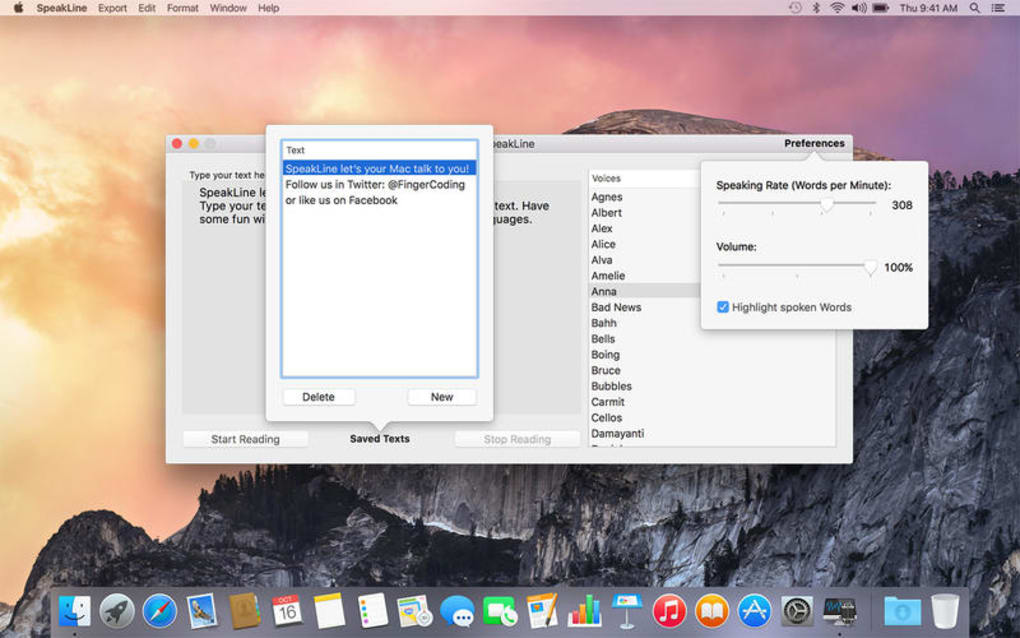
The software’s user interface is intentionally minimalistic: a clean window with a text pane, a phoneme selector, and real‑time playback controls. Users can type or paste any English text, choose from a variety of phonetic alphabets (including IPA, X‑Sampa, and a custom “SpeakLine” set), and instantly hear the synthesized speech.
The tool also offers export options for both audio files and annotated transcription sheets, making it easy to integrate the output into reports, presentations, or classroom assignments. Although the exact installation size is not publicly disclosed, the lightweight nature of the program means it occupies only a few megabytes on disk, leaving ample space for other applications. Security is built‑in: the app runs locally without requiring an internet connection, guaranteeing that no user data is transmitted to external servers.
SpeakLine’s free‑of‑charge model is particularly appealing for educational institutions that need a cost‑effective solution for large groups of students. By providing a robust set of features without any hidden fees, subscription plans, or intrusive advertisements, SpeakLine exemplifies the spirit of open‑source‑like generosity while remaining a closed‑source, professionally maintained product. Whether you are a linguist looking to experiment with phoneme timing, a teacher preparing classroom demos, or a hobbyist interested in exploring the sounds of English, SpeakLine delivers a secure, straightforward, and fully functional experience on your Mac.
Key Features of SpeakLine
- Real‑time phonetic transcription: Type or paste any English passage and watch the text convert instantly into IPA, X‑Sampa, or a custom alphabet.
- Instant speech synthesis: Hear your transcription spoken aloud with high‑quality, natural‑sounding voice output, adjustable speed, and pitch.
- Multiple export formats: Save audio as .wav or .mp3 and export annotated transcription sheets as .txt or .pdf for easy sharing.
- Offline operation: All processing occurs locally on the Mac, ensuring privacy and eliminating the need for an internet connection.
- Customizable phoneme library: Add, edit, or remove phonemes to tailor the tool to specific research or teaching requirements.
- Lightweight design: The installer occupies only a few megabytes, keeping system resources free for other tasks.
- Multi‑language UI (English only for now): Simple, intuitive menus and tooltips guide users through every step.
- Regular updates (last on 01‑04‑2017): Although development has slowed, the existing version remains stable on macOS X and older systems.
Installation, Usage & Compatibility
Installing SpeakLine on your Mac is a straightforward process that can be completed in under five minutes, even for users with limited technical expertise. Follow these steps to get the program up and running:
- Download the installer: Click the “Download SpeakLine” button on the official page. The file is a standard .dmg package, sized only a few megabytes, which ensures a fast and secure download.
- Open the DMG: Double‑click the downloaded file to mount the disk image. A window will appear showing the SpeakLine icon and a shortcut to the Applications folder.
- Copy to Applications: Drag the SpeakLine icon onto the Applications shortcut. macOS will automatically copy the app to the appropriate location.
- Verify security settings: Because SpeakLine is not distributed through the Mac App Store, you may see a warning the first time you open it. Go to System Preferences > Security & Privacy > General and click “Open Anyway” to allow the app to run.
- Launch the program: Navigate to the Applications folder and double‑click SpeakLine. The main window appears, ready for text input.
Compatibility: SpeakLine has been tested on macOS X 10.7 (Lion) through macOS 10.12 (Sierra) and works reliably on earlier versions as well. Users with the most recent macOS releases may experience minor UI scaling issues, but the core transcription and synthesis engine remains functional.
Once opened, using SpeakLine is intuitive. Paste your paragraph into the central text pane, select the desired phonetic alphabet from the drop‑down menu, and press the “Play” button to hear the speech. For more precise control, you can adjust the playback speed slider, mute individual phonemes, or export the result via the “File > Export” menu.
The program also supports keyboard shortcuts: ⌘+N for a new document, ⌘+S to save a session, and ⌘+P to print the transcription sheet.
Because the software runs entirely offline, you do not need to worry about data privacy or bandwidth consumption. All processing happens locally, making SpeakLine an ideal choice for classrooms with strict internet policies or for researchers handling sensitive linguistic data.
Updates, when they become available, are delivered as new DMG files; simply replace the old version in the Applications folder, and the program will retain your custom phoneme library and preferences.
Conclusion, Pros & Cons, FAQ & Call to Action
SpeakLine fills a niche that many larger language‑learning suites overlook: a free, lightweight, and secure Mac‑only tool dedicated to phonetic transcription and speech synthesis. Its simplicity does not sacrifice functionality; educators can produce polished audio examples in minutes, while linguists gain a quick sandbox for testing phoneme hypotheses. Although the development cadence has slowed since the 2017 update, the existing feature set remains robust for most educational and research scenarios.
Pros
- Completely free with no hidden fees or ads.
- Runs offline, guaranteeing data privacy.
- Supports multiple phonetic alphabets, including IPA.
- Lightweight installer and low system resource usage.
- Simple UI that is easy for beginners to master.
Cons
- No native support for Windows, Android, or iOS.
- Last major update was in 2017, so some UI elements feel dated.
- Limited to English language input; no multilingual dictionary.
- No cloud sync or collaboration features.
- Documentation is minimal, requiring users to explore the interface.
Frequently Asked Questions
Is SpeakLine truly free or does it contain hidden costs?
SpeakLine is completely free to download and use. There are no subscription fees, in‑app purchases, or advertisements. All features are available out of the box.
Can I use SpeakLine on a Windows or Linux computer?
Currently SpeakLine is built exclusively for macOS. Windows, Linux, Android, and iOS users will need to look for alternative phonetic tools.
Does SpeakLine require an internet connection?
No. All transcription and synthesis processes are performed locally on your Mac, so you can work offline without any data being sent to external servers.
What audio formats can I export from SpeakLine?
You can export the generated speech as either .wav or .mp3 files. Transcription sheets can be saved as plain .txt or formatted .pdf documents.
Is there any way to customize the phoneme library?
Yes. SpeakLine includes a built‑in editor that lets you add, rename, or remove phonemes. Your custom library is saved with the application, so it persists across sessions.
If you’re looking for a secure, free, and easy‑to‑use Mac app to experiment with phonetic transcription or to generate speech samples for classroom use, SpeakLine is a solid choice. Download it today, explore its feature set, and let the simplicity of its design help you focus on what matters most – the language itself.







